New version of Act!
All of our add-ons are compatible with Act! v27
All of our add-ons have been upgraded to Act! v27. You can download the updated version from our v25/26/27 download page.
More on Upgrading
New add-on
Better Last Activity Date Tracking
Know how every time you mark a meeting as complete, the Last Meeting date gets updated? You can now create the same type of automation when closing any type of activity (not only the standard act! activities).
Any date field can be updated including the "Last" system fields (Last Meeting, Last Reach, etc.).
Better Last Activity Date Tracking also allows you to update not only a contact field but also a company, group or opportunity field if such a record is associated with the activity you're clearing.
More on Better Last Activity Date Tracking
The best Excel Export/Report tool for Act!
Advanced Export To Excel
You can now export data to create reports in Excel in a far more efficient way than the Export to Excel feature provided by Act!.
Advanced Export To Excel supports multi-table export (contact, company, group, opportunity, history, activity and note) and inserts the exported data in the Excel worksheet of your choice (instead of dropping it into a blank spreadsheet like Act! does). This way you can create great looking reports using any cell formatting you want (including conditional formatting) and create calculations and totals.
More on Advanced Export to Excel
Export Act! data to your PDF forms in a snap
With Act! to PDF Forms allows you to merge contact, company, opportunity, group data into existing PDF Forms. No need to retype anything!
More on Act! to PDF Forms
Web Forms and Act!, finally an efficient solution!
Online form results can now be imported directly into ACT!. No need to copy & paste from e-mails anymore. You don't even need to have a Web site! Check how Automatic Web Forms revolutionizes working with Online Forms. Ideal for newsletter subscriptions forms, training courses, online applications, surveys, etc.
More on Automatic Web Forms for ACT
E-mail Marketing
MailChimp plugin II for ACT!
 Using MailChimp, one of the leaders of the Email Marketing and Email List Manager market? You can now import data from MailChimp into ACT! and export contacts from ACT! to MailChimp!.
More on the MailChimp Plugin II for ACT!
Favorites for ACT!
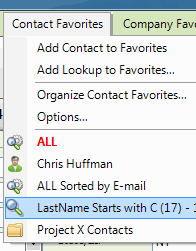 Finally a way to create a list of favorites in ACT!. You can now quickly access your favorite records (contact, company, group or opportunity records), save lookups whether static or dynamic, quickly move from one view to another without having to always redo the same lookups. Check it out: it is a real time saver!
More on Favorites for ACT!
Our contribution to the ACT! community
Free ACT! add-ons
Our free ACT! add-ons can make ACT! work better for you. Make sure you take advantage of them!
Our latest addition: Default Lookup Field allows you to set the field of your choice as default for the lookup feature of ACT! navigation bar.