Advanced Excel Templates
» What's new in this version
Ever wished you could merge ACT! information in Excel using the same easy method you use with Word? With Advanced Excel Templates you can!
If you are able to create a Word template with ACT!, you are able to create an Advanced Excel Template. We made it as simple as possible, mimicking the way you create templates in MS Word or in ACT! Word Processor.
Create your own templates in minutes
Launch Advanced Excel Templates, click File>New Template and the program will open a new document in Excel with a popup window allowing you to insert ACT! field placeholders in the spreadsheet.
Once this is done, save and you have your new template. You're ready to go!
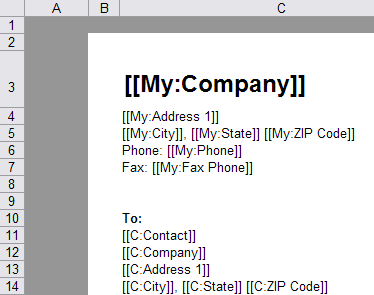
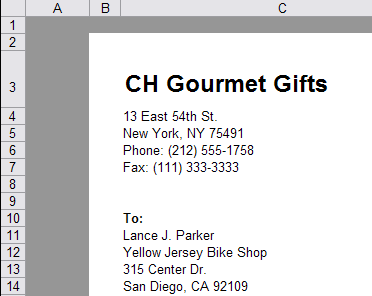
Merging a document is a 2 simple step process
- You select the contact in ACT!
- You launch Advanced Excel Templates for ACT!, pick a template and click OK.
Automatically number your documents
with our AutoNumbering system
AutoNumber your documents
With our AutoNumbering system, you may define as many automatic number formats as you want, one for your quotes, one for your invoices and select it when generating your document.
You may also want to look at our AutoNumbers for ACT! Record add-on which, among other features, allows you to automatically autonumbers your opportunities at creation time.
Use Excel as a calculator!
You may even use the power of Excel to perform calculations and update one or more of the current contact fields with the result of the calculation. Let's say you want to add User1 and User2 and put the total in User3. You could export User1 and User2 to Excel, have Excel calculate the sum and return it to the User3 field. All you need to do is insert an Excel->ACT field in your template.
You may even perform this operation in the background, without opening the merged document.
How is it different from Excel Quote-Invoice Maker?
Advanced Excel Templates exports data from either the Contact table or the Company table or the Group table or the Opportunity table but cannot combine data from 2 tables (a workaround could be to use Copy Data Between Records). Excel Quote-Invoice Maker is designed to export Contact + Opportunity or Company + Opportunity or Group + Opportunity data to Excel.
As a consequence, another difference is that Advanced Excel Templates has the ability to export more than one record at a time (for instance you can create 10 documents with data from 10 different contacts at once), but not Excel Quote-Invoice Maker (you can create a quote or invoice with multiple opportunities and products but not multiple quotes or invoices at once).
NOTE: Requires Excel 2000 or higher. Compatible with Office 2007 and 2010.
What's new in the version for ACT! 2010
Advanced Excel Templates is a greatly enhanced version of Excel Templates for ACT!, hence the change of name.
- You can now export company, group and opportunity data: you are not limited to contact data anymore.
- You can now create more than one document at a time.
- You can now autonumber your documents using an automatically incremented numbering system.
- You can now export photos.
- The document naming convention is now shared among users in a multi-user environment and now uses field display names instead of internal field names.
- You now have access to online help through the Help>Online help menu.
» The best way to discover this add-on
is to browse its online help